
All 24 industry reel generators
AI video generator for dental practices
Every dental team answers the same handful of questions dozens of times a week, and almost none of those answers ever reaches the people scrolling past the practice online. ReelSeconds — an AI video generator for dental practices — takes one typed question, such as why gums bleed during brushing, and returns a finished 9:16 reel: a written hook at the top of the frame, a measured voiceover underneath, generated footage behind it and captions burned onto every word.
Nothing in that pipeline asks you to film a surgery, chase a consent form or learn an editing timeline. You describe the topic; the system writes the script in three separate parts, records the narration with word-level timestamps, generates the visuals and assembles the file in your browser. What downloads is an MP4 in the native shape for Instagram Reels, TikTok and YouTube Shorts, made without a single patient appearing on camera.
Make a dental practices reel nowSign-up comes with 20 free credits — roughly two explainer reels — and asks for no card.
Patients book with the practice that explains things
Dentistry carries a level of fear that most local businesses never have to think about. A meaningful share of the people who have not booked a check-up in years are not careless; they are anxious, and they are anxious partly because nobody has ever walked them through what actually happens in the chair. A thirty-second explainer that calmly describes a scale and polish, or what a first appointment involves, does quiet work on that fear. It is also the one kind of marketing a practice can publish without it feeling like marketing: it informs first, and the booking follows from the trust rather than from the pitch.
The raw material already exists at the reception desk. Every practice keeps an informal list of the questions that come up daily: does a hygiene visit hurt, how long does a crown take, what should a child expect at a first visit, what should you do after an extraction. Each of those is a reel. None of them requires a camera, a consent form or an afternoon of editing — they require a sentence typed into a panel and a few minutes of waiting, and the answer arrives as captioned vertical video ready for the platforms where those future patients already scroll.
Tone matters more in dentistry than in almost any other local category, which is why the voice options deserve a moment's thought. The narration is recorded by an AI voice — Jackson if you want energy, Michael if you want calm, Candy for warmth — and for patient-facing education the quieter registers usually serve better. The hook that appears at the top of the frame is written, never spoken, so the on-screen line can be direct while the voiceover underneath stays gentle, unhurried and free of alarm.

Where an AI video generator for dental practices earns its slot in the week
The honest pitch is not that video transforms a practice; it is that the practice already has ten spare minutes on a Thursday and currently produces nothing with them. Type the topic into the generator panel on this page — it arrives preset with a dental template — and four stages run in sequence: a script pass writes the on-screen hook, the voiceover narration and a visual brief as three separate artifacts; the chosen voice is recorded with a timestamp on every word; a text-to-video model renders continuous vertical footage from the brief; and your own browser assembles captions, hook overlay, closing call to action and audio into a single 9:16 MP4.
A standard fifteen-second reel costs 10 credits, a run on the HD visual base costs 25, and stretching to the thirty-second maximum adds 10 more; failed runs refund themselves. At that price the sensible habit is a small standing rotation: one education topic each week, one practice announcement whenever there is one, and the occasional seasonal reminder. Three or four reels a month keeps a practice visibly alive online, and the whole month's output costs less of your time than a single staff meeting does.
- The chairside explainer. One question, one calm answer. What a scale and polish involves, why a filling needs replacing, whether sensitivity after whitening is normal — the questions your team already answers out loud every day.
- The practice noticeboard. A new hygienist starting, altered holiday hours, new-patient places opening. Announcements that would otherwise be a plain text post get a voice, footage and captions instead.
- The seasonal nudge. Mouthguards before contact-sport season starts, check-ups before the school year, a gentle reminder as insurance years close. The calendar writes these briefs for you.
Privacy, outcome claims and what the footage really shows
Patient privacy is not a footnote here; it shapes how the tool should be used. The brief you type is a topic, never a case. What to expect at a hygiene appointment is a reel; how you treated a particular patient's recession is not, no matter how anonymised it feels. Because nothing in the pipeline touches your patient records, appointment book or clinical photographs, there is nothing to redact and no consent to secure — provided you keep it that way. The discipline is simple: educational topics in, general answers out, and no detail that began life in a clinical note.
Be equally clear-eyed about what the footage is. The visuals are AI-generated b-roll produced from a written description — a bright, orderly clinical space, an abstract close-up, a person at a bathroom mirror. No smile in the frame belongs to a real patient of yours, and no image shows a real clinical result, before, after or otherwise. That is a privacy feature and a hard honesty boundary at the same time: never caption generated imagery in a way that invites viewers to read it as your patient or your work, and never use this tool to state or imply a treatment outcome. Regulators in most jurisdictions treat implied outcome claims exactly as they treat stated ones.
There are jobs this is the wrong tool for, and it is cheaper to recognise them now. A genuine smile transformation deserves real photography, taken with written consent and presented with appropriate caveats — generated video adds nothing there and risks plenty. Testimonials must come from real patients or not exist at all. Where this earns its keep is the unglamorous middle of the calendar: the education, the reminders and the announcements that would otherwise be a text post or, more often, nothing at all.
More reels from the same pipeline
The exact studio behind this page also made these — different topics, one workflow. Each is a real generation, labelled with the prompt topic it came from.
Five stages between a chairside question and a posted explainer
- 01
Start with the question from the chair
Type it the way a patient asks it, not the way a textbook would. One line is the whole brief — the topic, who it is for, and the action you want at the end, such as booking a hygiene visit.
- 02
Three artifacts, drafted separately
The script stage writes an on-screen hook that is displayed but never spoken, a voiceover narration in plain reassuring English, and a visual brief for the footage model. Keeping the three apart is what stops screen text being read aloud.
- 03
Pick the register, capture the timings
Choose the voice — Jackson is energetic, Michael calm, Candy warm; calm tends to suit clinical topics. The narration is recorded with a timestamp on every single word, which is what the captions will later be pinned to.
- 04
The footage model sets the scene
From the visual brief, a text-to-video stage generates continuous 9:16 footage — clinical-adjacent atmosphere rather than any real premises. This render is the longest wait in the pipeline, typically one to three minutes.
- 05
Your browser finishes the job
Assembly runs locally: captions land on the real word timings, the hook overlays the top of frame, a closing call to action appears and the audio is muxed in. A 9:16 MP4 downloads, ready for whichever platform you post to first.
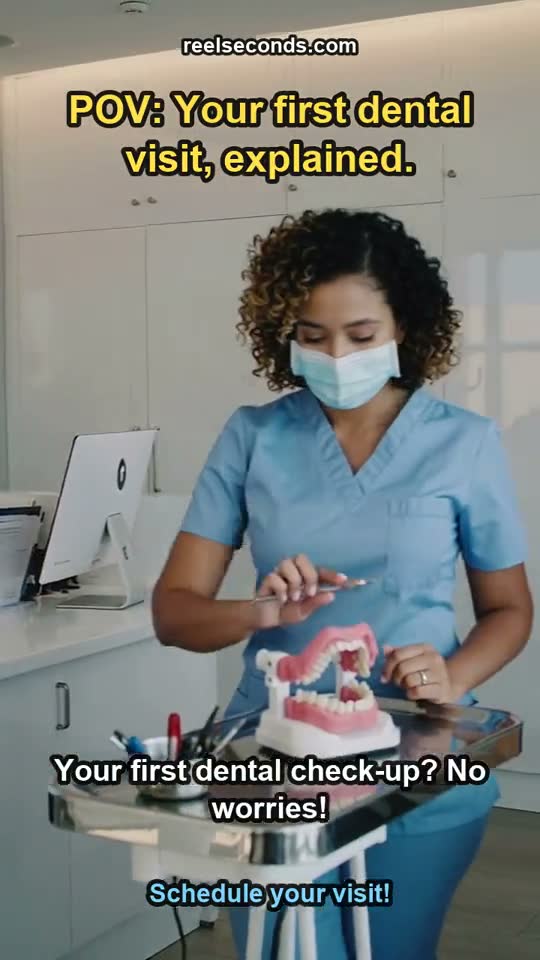
The script package behind the reel above
This is what the script stage actually returned for that listing — three separate outputs, exactly as the pipeline stored them. Nothing here is a sample written for the marketing page.
- On-screen hook (written, never spoken)
- “POV: Your first dental visit, explained.”
- Voiceover script (46 word timings, 6 caption lines)
- “Your first dental check-up? No worries! We'll start with a warm welcome and easy paperwork. Our friendly hygienist will gently clean your teeth and take X-rays. Then, the dentist will review your health, answer questions, and discuss next steps. You'll leave feeling confident and cared for!”
- Visual prompt for the footage model
- “Smooth, continuous tracking shot through a modern, brightly lit family dental clinic. Begin with a friendly receptionist greeting a diverse family at a clean front desk. Transition to a hygienist gently demonstrating a tooth cleaning on a dental model, then a quick shot of a patient comfortably in a dental chair. End with a dentist warmly chatting with a family, smiling. Soft, natural lighting, clean aesthetic.”
- Closing call to action
- “Schedule your visit!”
What dental teams ask before their first run
- Do we need to film anything in the practice?
- No. The visuals are AI-generated b-roll built from a written description, so there is no crew, no camera and no afternoon lost to filming. That cuts both ways: an AI video generator for dental practices can never show your actual reception, team or treatment rooms, and it should not pretend to. Use it for education and announcements, and keep genuine photography for the moments that need the real thing.
- Is the person in the footage a real patient?
- No, and this matters more in dentistry than almost anywhere else. Every face, mouth and smile in the generated footage is synthetic, produced by a text-to-video model from a written brief. Nothing depicts a real patient of yours and nothing shows a real clinical result, so never write a caption that invites viewers to read it that way — the honesty protects your patients and your registration alike.
- What does each reel cost in credits?
- A standard fifteen-second reel costs 10 credits. Choosing the HD visual base raises that to 25, and extending a reel to the thirty-second maximum adds another 10. Runs that fail refund their credits automatically. A new account starts with 20 free credits — about two standard reels — with no card required, which is enough to test one education topic properly before deciding anything.
- How long from typed question to finished file?
- Minutes rather than hours. The footage render typically takes one to three minutes, and the final assembly — captions, hook, audio — runs in your own browser in under a minute for a fifteen-second reel. It expects a reasonably modern computer; on a phone the assembly step is noticeably slower, so the laptop at the front desk is the comfortable setup.
- Can we use the reels commercially, and is there a watermark?
- Reels made on the free tier carry a small reelseconds.com watermark in the frame. Paid plans export clean files and include a commercial licence, which is the right footing for anything published under the practice's name. Either way the MP4 downloads to your machine and you post it from the practice's own accounts.
- Which platforms is the output built for?
- The output is a vertical 9:16 MP4, which is the native format for Instagram Reels, TikTok, YouTube Shorts and vertical paid placements. Because captions are burned in on the voiceover's own word timings, the reel still reads clearly with the sound off, which is how feeds are usually browsed — in waiting rooms very much included.
Start free, upgrade when it pays off
Every account starts with 20 free credits — about two dental practices reels, no card required. A standard reel is 10 credits; paid plans run $9.99 Starter to $79 Studio. See the full pricing table.
Sign up free & make a dental practices reelExplore by industry
More industry reel generators
 Hair salons
AI Video Generator for Hair Salons
Booking-driven trend and stylist reels for salons
Open Travel agencies
AI Video Generator for Travel Agencies
Destination-mood and seasonal-offer reels for travel sellers
Open SaaS startups
AI Video Ads for Saas Startups
Hook-first ad reels for early-stage SaaS teams
OpenMore industries
- AI Video Generator for Real Estate Listings
- UGC Ads for Skincare Brands
- AI Video Ads for Mobile Apps
- AI Video Generator for Restaurants
- AI Video Generator for Course Creators
- AI Video Generator for Fitness Coaches
- AI Video Ads for Shopify Stores
- AI Video Generator for Etsy Sellers
- AI Video Generator for Law Firms
- AI Video Generator for Nonprofits
- AI Video Generator for Podcasters
- AI Video Generator for Jewelry Brands
- AI Video Generator for Coffee Shops
- AI Video Generator for Car Dealerships
- AI Video Ads for Pet Brands
- UGC Ads for Supplement Brands
- AI Video Generator for Wedding Photographers
- AI Video Generator for Fashion Brands
- AI Video Generator for Home Service Businesses
- AI Video Ads for Dropshipping Products