
All 24 industry reel generators
AI video generator for course creators
ReelSeconds is an AI video generator for course creators who have to post short vertical video on a launch schedule instead of a production schedule. You give it one line — the module you are teaching this week, the objection you want to take apart, the day the cart opens — and the pipeline writes the script, records the voiceover, generates the footage and burns the captions into the frame. What comes back is a 9:16 MP4 ready for Instagram, TikTok or YouTube Shorts, with no editor to open and no camera to set up.
A run works exactly that way: one line in, a finished file out a few minutes later, 10 credits spent, nothing touched by hand afterwards. That gap matters more than it sounds, because what quietly kills a launch runway is not a shortage of teaching ideas. It is the twenty minutes of framing, lighting, re-takes and captioning that sit between having the idea and having something posted.
Make a course creators reel now20 free credits on sign-up — roughly two reels. No card, no camera, no editing timeline to learn.
Why the pre-launch runway goes quiet
Every cohort and every evergreen relaunch has the same shape. There is a long stretch of building and refining, a short window where enrolment is open, and between them a runway of two to four weeks where the audience is meant to be warmed up. That runway decides most launches. It is also where most creators go silent, because warming an audience means showing up daily with something short and genuinely useful at exactly the moment you are still finishing lesson eleven and rewriting the sales page.
Video is the format that carries furthest in that window — an idea with a voice on it travels further than the same idea as text — and it is also the format with the highest cost per unit. Getting on camera means being presentable, finding a room that does not echo, holding the thread for forty seconds, then trimming, captioning and exporting. Multiply that by fourteen days of runway and the honest outcome is four posts instead of fourteen, most of them crammed into the final week when there is no time left for anyone to warm up.
A tool is only useful here if it collapses the whole chain rather than one link. A script generator still leaves you the recording. A stock footage library still leaves you the voiceover and the captions. This pipeline ends at a finished file, which turns the daily cost of a runway post into a sentence of thinking rather than half an afternoon of production.

What an AI video generator for course creators has to understand
Teaching content has a grammar that a generic tool ignores. A reel aimed at a future student almost never opens with the topic — it opens with the mistake, the misconception or the thing they have been told that is wrong. That is the only opening that earns the next three seconds from someone who has scrolled past four other people talking about the same subject. The middle then has to teach one thing properly, in a way that leaves the viewer slightly more capable than they were, rather than listing five things at a speed nobody can retain.
The ending is where most creator reels break down. A reel that ends with a generic invitation to follow does nothing for a launch. A reel that ends on a specific, small next step — join the waitlist, take the free lesson, comment a word to get the worksheet — converts attention into an audience you can actually email when the cart opens. The script stage writes the hook, the narration and the closing call to action as separate pieces, which is why the narrator never reads a hashtag or an on-screen label out loud.
Captions are not decoration for this audience. Learning content gets watched with the sound off, at night, on a phone, in between other things. If your one clear idea only exists in the audio, most of the people who saw the reel never received it. Every reel from this pipeline has captions burned in on the voiceover word-level timings that the speech stage returns, rather than on a second-pass transcription that drifts a beat behind the read.
- One idea per reel. A single teachable point, finished properly, beats a list of five delivered too fast to hold. Save the other four for the other four days of the runway.
- A next step, not a hard sell. The closing line asks for something small and specific — the waitlist, the free lesson, a reply — so a scroll can become a subscriber before the cart ever opens.
- Readable with the sound off. Captions ride the real word-level timings from the voiceover, so the point still lands for the majority of viewers who never turn the volume on.
Promise the transformation, leave the income claims out
The thing people buy a course for is a change in what they can do. Not the modules, not the hours of footage, not the community — the specific capability on the other side. A good runway reel makes that concrete: after this, you can read a balance sheet without opening a tutorial; you can sit down on a Sunday and have next week of meals handled; you can take a client brief and price it without guessing. Concrete capability is both better marketing and a more honest description of what you are selling than an abstract promise about transformation.
The failure mode in this category is the income claim. Numbers about what students earn, what they replaced, how fast they quit — those are the lines that draw platform enforcement, advertising complaints and refund requests, and they are almost never something you can substantiate for a typical buyer rather than your best one. Using an AI video generator for course creators does not move that responsibility anywhere. The script stage writes about skills and outcomes rather than earnings, but you are the publisher: read the script before it goes out, the same way you would read anything an assistant drafted under your name.
- Say what they will be able to do. Name a capability the student walks away with. It is more persuasive than a superlative and it is something you can stand behind.
- Do not put numbers in that you cannot defend. Earnings, timelines to results and success rates invite scrutiny you do not want mid-launch. Leave them out of the script rather than qualifying them afterwards.
- If you quote a student, quote a real one. A generated reel is a fine vehicle for a real student quote you have permission to use. It is not a place to invent one.
Where this belongs in a creator stack
This is a volume instrument. It is at its best on the daily runway post, the waitlist announcement, the objection-handling reel, the module teaser, the last-call reminder and the evergreen top-of-funnel content that keeps working between launches. It is also the cheapest way to test a hook: generate the same lesson three times with three different openings, post all three across a week, and let the audience tell you which framing they respond to before you build a whole campaign on a guess.
It is not a replacement for you on camera. The trust content of a course business — your face, your voice, your actual explanation of why you built the thing — has to be filmed, and an AI video generator for course creators does not attempt to fake it. Nor does it record your lessons, capture your screen, or produce the walkthroughs students watch inside the course. There is no timeline editor, no stock library, no scheduler and no team seats here. It generates a new short vertical reel from a line of text, downloads it as an MP4, and stops.
The practical arrangement most creators land on is a split: film the handful of pieces that need your face, and generate the daily volume around them. That way the runway stays populated for the full four weeks instead of the last four days, and the filming budget goes to the videos where being on camera is the entire point.
More reels from the same pipeline
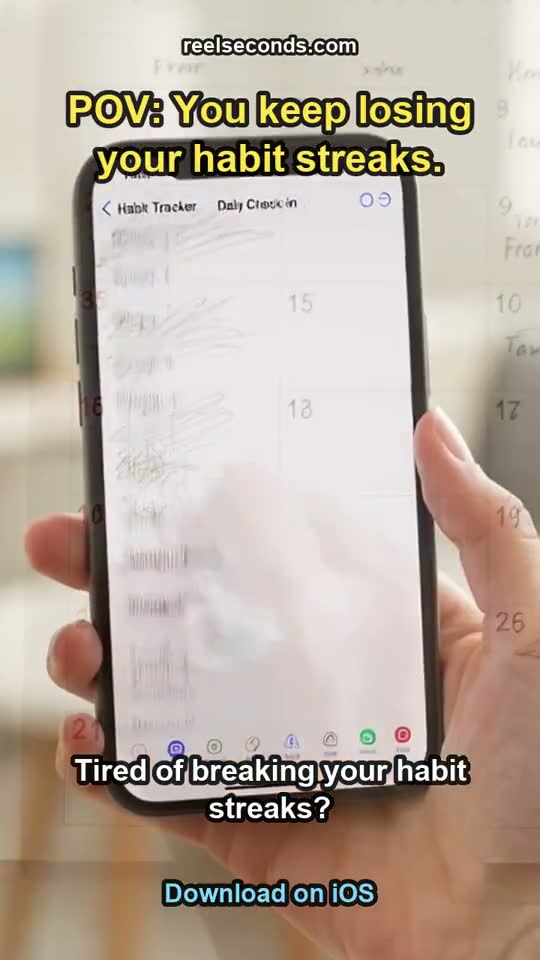
The exact studio behind this page also made these — different topics, one workflow. Each is a real generation, labelled with the prompt topic it came from.
Running the AI video generator for course creators through a launch week
- 01
Start from one line of your launch calendar
The lesson, the misconception you want to break, or the milestone you are announcing, plus the date if there is one. A line like "why most people quit learning to draw in week three, waitlist opens Monday" is enough to brief the whole run.
- 02
The script comes back in four pieces
An on-screen hook, the spoken narration, a closing call to action and a visual prompt for the footage. They are written separately on purpose — the hook is text you read, the narration is language you hear, and mixing them is what makes generated reels sound like adverts.
- 03
The voiceover is recorded with timings attached
Text-to-speech returns the audio along with word-level timestamps. Those timings are what let the captions sit exactly on the read rather than sliding out of sync halfway through a sentence.
- 04
Vertical footage is generated for the idea
AI text-to-video builds continuous 9:16 footage from the visual prompt — a desk, a notebook, a hand working through something — instead of panning slowly across a stock photo you have already seen on three other accounts.
- 05
Captions, hook and audio are assembled
The assembly stage burns in the captions on the real timings, lays the hook over the opening, adds the watermark on the free tier and mixes the voiceover against the footage. The result is a 720x1280 MP4.
- 06
Download it and post it, then run the next one
The file lands in your downloads folder ready for Reels, Shorts or TikTok. A reel costs 10 credits, so a runway is budgeted in credits rather than in afternoons.

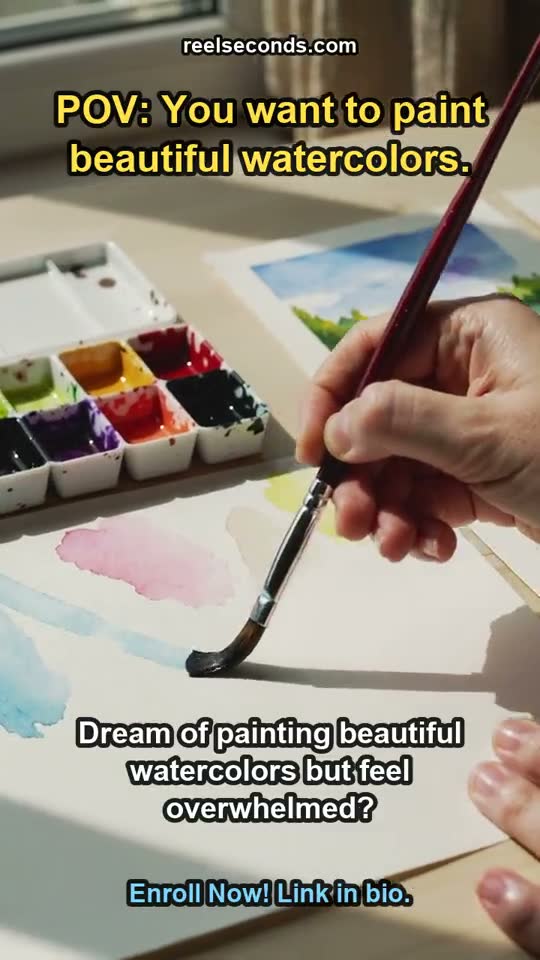
The script package behind the reel above
This is what the script stage actually returned for that listing — three separate outputs, exactly as the pipeline stored them. Nothing here is a sample written for the marketing page.
- On-screen hook (written, never spoken)
- “POV: You want to paint beautiful watercolors.”
- Voiceover script (38 word timings, 6 caption lines)
- “Dream of painting beautiful watercolors but feel overwhelmed? My 30-day course transforms beginners into confident artists. I've guided thousands to unlock their creative potential. Imagine creating stunning art with ease. Ready to start your artistic journey? Enroll today!”
- Visual prompt for the footage model
- “Close-up, smooth tracking shot of hands gently applying watercolor to paper, brushstrokes creating vibrant, flowing colors. Sunlight streaming onto a clean, minimalist art desk. The camera subtly pans over a collection of finished, diverse watercolor paintings – landscapes, florals, abstract – showcasing skill progression. Warm, inviting, inspiring mood.”
- Closing call to action
- “Enroll Now! Link in bio.”
Questions course creators ask
- Do I have to appear on camera at all?
- Not for these reels. The footage is generated from your description and the narration is synthetic, so a reel can be made on a day when you are not presentable and your office is a mess. You should still film the trust content — the founder story, the honest pitch, the answers to hard questions — because that is the part of a course business people buy into personally.
- Can it produce my actual course lessons?
- No. This makes short vertical marketing reels, not lesson videos. There is no screen recording, no slide import and no long-form export, and the footage is illustrative rather than instructional. Your lessons still get recorded the way you record them now; this covers the promotional layer around them.
- What exactly should I put in the one line?
- The teaching point plus any deadline attached to it. "Three signs your pricing is too low, doors close Friday" gives the script stage a hook, a body and a call to action to work from. Vaguer briefs still produce a reel, but they produce a generic one, so the specificity you put in is what you get back.
- How much can I make with the free credits?
- New accounts get 20 credits and a reel costs 10, so about two finished reels with no card involved. Free-tier output carries a small watermark, which is fine for testing a hook or seeing whether the format suits your audience, and worth removing before anything goes out under your brand during a launch.
- Can I generate several versions of the same lesson?
- Yes, and it is the main reason to use a generator at all. Run the same teaching point with three different openings — the mistake, the deadline, the result — and post them across the week. Each run is billed separately in credits, and comparing three real posts tells you more about your audience than any amount of planning.
- Is the generated copy safe to publish as-is?
- Read it first. The script stage writes about skills and outcomes rather than earnings, but you are the one publishing, and course marketing sits under advertising rules that vary by country and by platform. Treat the script as a strong draft from a copywriter who does not know your legal position, and adjust anything that overstates what a typical student gets.

Start free, upgrade when it pays off
Every account starts with 20 free credits — about two course creators reels, no card required. A standard reel is 10 credits; paid plans run $9.99 Starter to $79 Studio. See the full pricing table.
Sign up free & make a course creators reelExplore by industry
More industry reel generators
 Dental practices
AI Video Generator for Dental Practices
Patient-education and practice reels for dentists
Open Hair salons
AI Video Generator for Hair Salons
Booking-driven trend and stylist reels for salons
Open Travel agencies
AI Video Generator for Travel Agencies
Destination-mood and seasonal-offer reels for travel sellers
OpenMore industries
- AI Video Generator for Real Estate Listings
- UGC Ads for Skincare Brands
- AI Video Ads for Mobile Apps
- AI Video Generator for Restaurants
- AI Video Generator for Fitness Coaches
- AI Video Ads for Shopify Stores
- AI Video Generator for Etsy Sellers
- AI Video Generator for Law Firms
- AI Video Generator for Nonprofits
- AI Video Generator for Podcasters
- AI Video Ads for Saas Startups
- AI Video Generator for Jewelry Brands
- AI Video Generator for Coffee Shops
- AI Video Generator for Car Dealerships
- AI Video Ads for Pet Brands
- UGC Ads for Supplement Brands
- AI Video Generator for Wedding Photographers
- AI Video Generator for Fashion Brands
- AI Video Generator for Home Service Businesses
- AI Video Ads for Dropshipping Products